Microsoft is Phishing Me?!
Marketing strikes again!
There is nothing better than coming into a high severity alert in Defender first thing in the morning - "A potentially malicious URL click was detected". First and foremost the alert name itself needs to be changed, either it happened or it didn't. But that is neither here nor there, now normally these alerts are false positives which can be confirmed by visiting the device in questions Defender timeline and running a quick search or if you have a SIEM running a query to see if there is any log showing a successful network connection. On this day however I was a bit surprised about what I found.
The link in question:
https://public-usa.mkt.dynamics[.]com/api/orgs/8f7d6d5b-1bf6-f011-aa23-6045bd003e1d/r/6xZ0CX5YEkWEQ8qGilUDAAEAAAA?msdynmkt_target=%7B%22TargetUrl%22%3A%22https%253A%252F%252Fops.fotografca.net%252F%22%2C%22RedirectOptions%22%3A%7B%225%22%3Anull%2C%221%22%3Anull%7D%7D&msdynmkt_digest=FFqgalNBjAOO6eTA36ZNpSbb3cEBRztbON44melB8TM%3D&msdynmkt_secretVersion=a3955a744d9049f88dd8bdc1907bf2bf
To start my investigation I begin with removing all of the fluff, and popping the domain into VirusTotal just to see what we are working with.
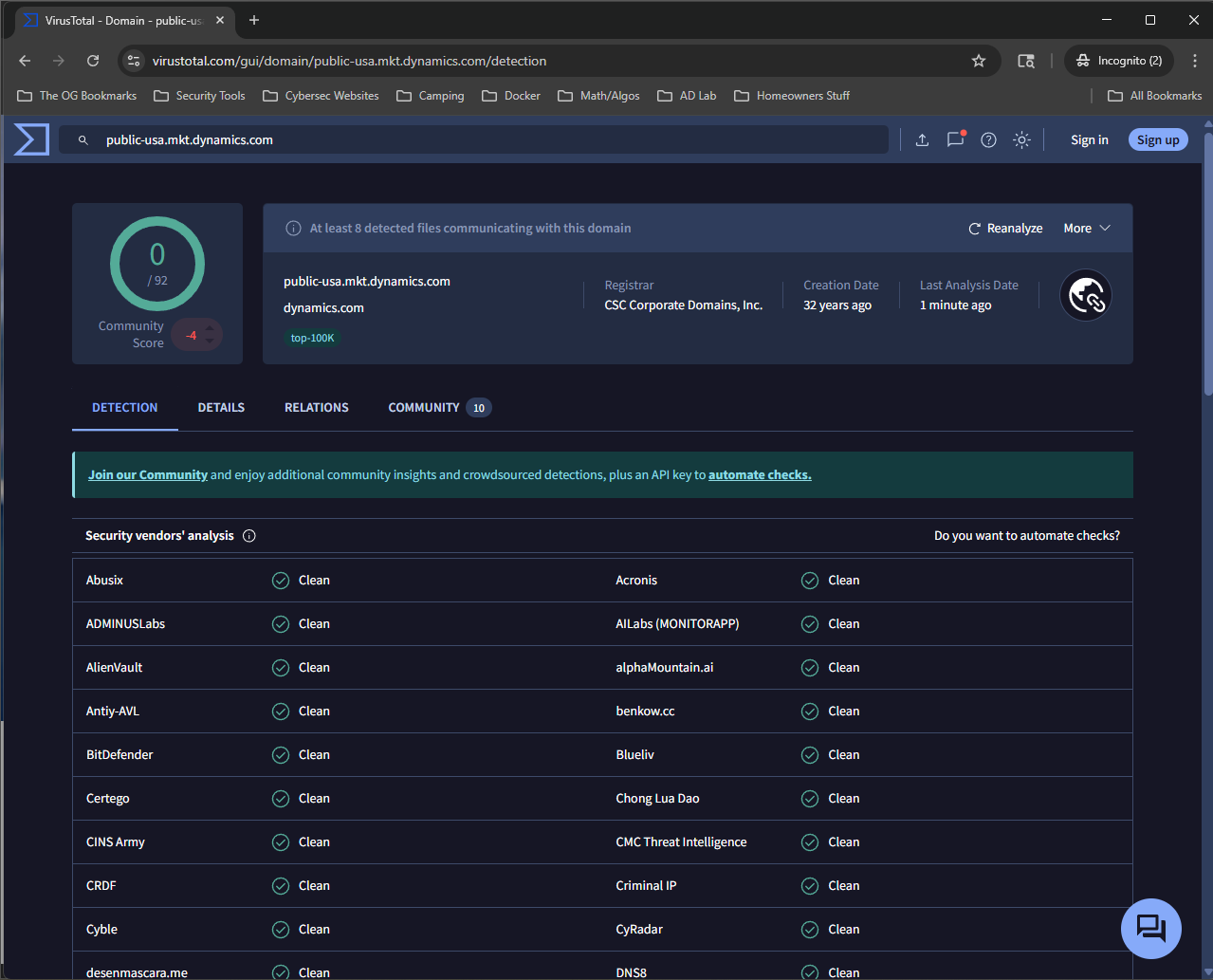
We can see from the information in VirusTotal that it is considered "clean" since it is showing 0/92, the register is CSC Corporate Domains, Inc, it was created 32 years ago. A WHOIS lookup will show that the domain dynamics.com is registered to Microsoft Corporation.
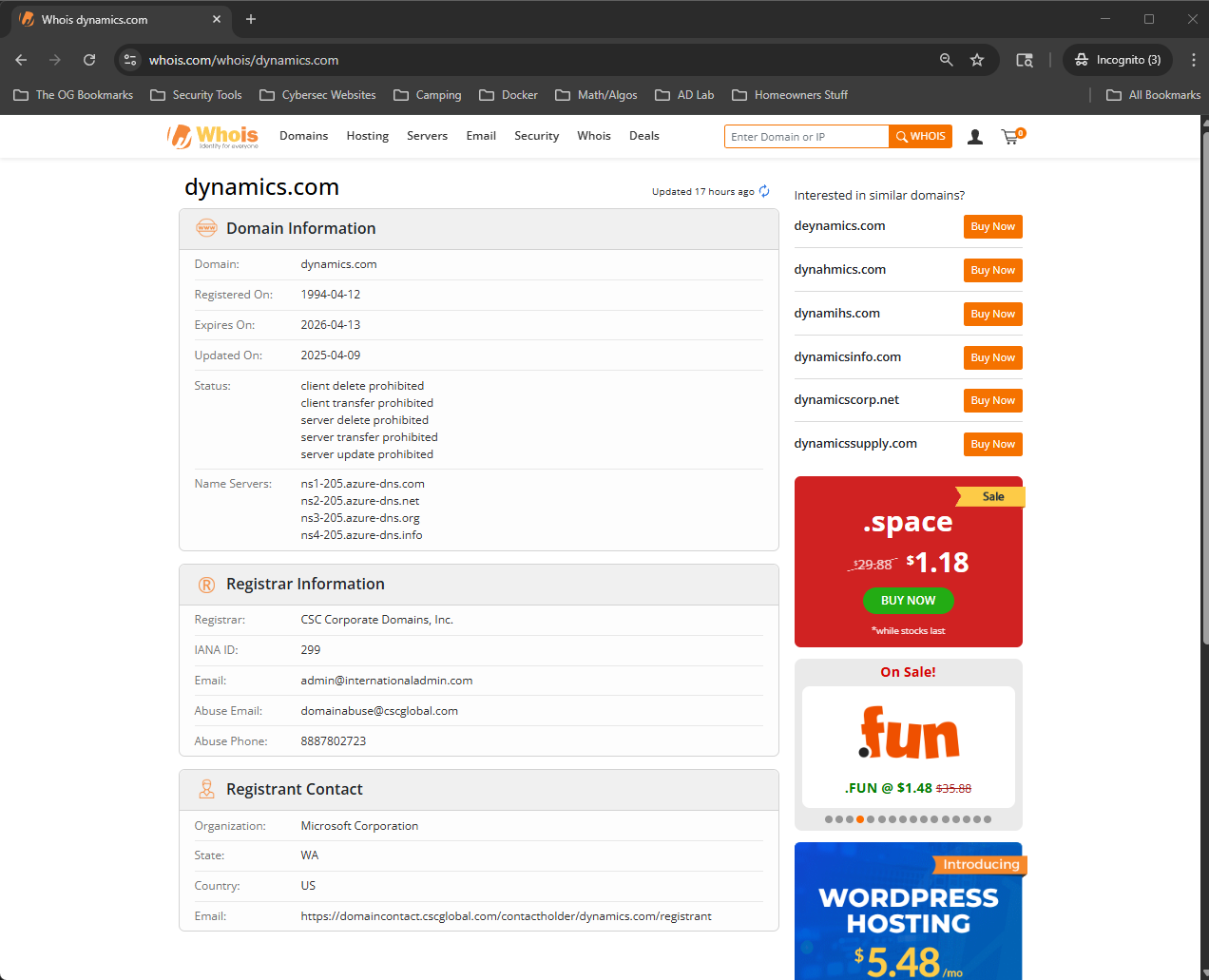
With that information, we are leaning towards this alert is a false positive. But just to make sure we can run the URL through a sandbox, I prefer to use Any.Run, putting the entire URL and running a public analysis (side note: if you believe the URL or file is something that could contain company proprietary information don't use Any.Run because it will be accessible to the public). After connecting we can see that the URL redirects to ops.fotografca.net, putting that in VirusTotal we get 1/92 - with ESET marking the site as "phishing".
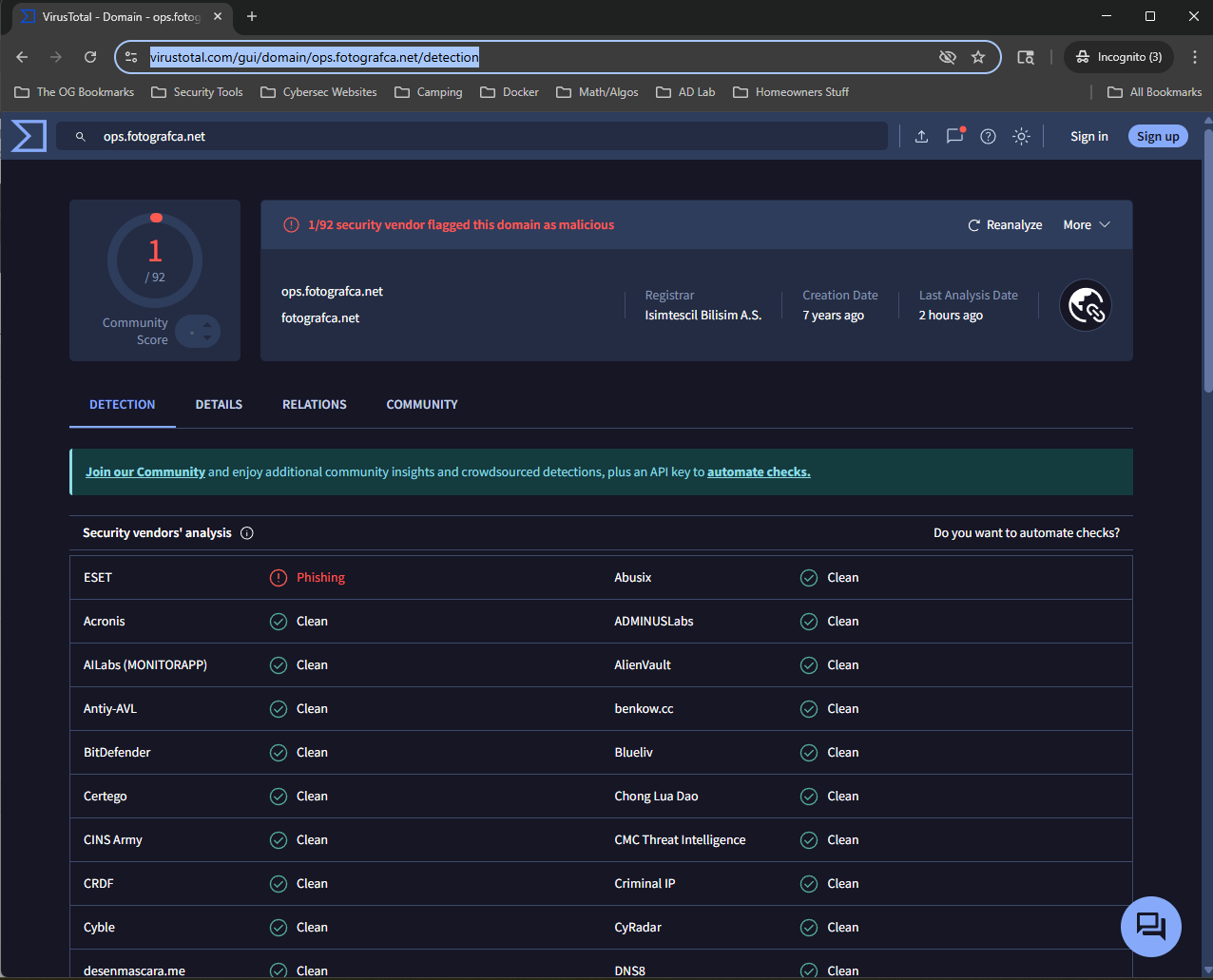
So I guess that's a wrap the URL redirects to a "phishing" page.
But wait there's more?!
What didn't make sense to me however was how ops.fotografca.net was a "phishing" website, since what I was seeing in ANY.Run had no attributes of a normal phishing page i.e. it didn't land on a legitimate login portal. I ran a cURL command just to see if it would provide me any additional information and it didn't really give me anything more. I did see that it contained a JavaScript file and when I opened that, it looked like a bot detection script. I started thinking that maybe that script was inhibiting me for seeing the real page.
Armed with this idea, I went on a search to figure out a "safe" way to browse the URL in the alert without using my own browser, and I landed on ultrafunkamsterdam undetected-chromedriver In the README you can see this Python code is an "optimized Selenium Chromedriver patch which does not trigger anti-bot services". So after many trials I was finally able to construct a Python script is "kind of" secure and can be used navigate to potentially malicious web pages (its probably best to use this on a test system, you can try a VM but every time I tried to get to the final page it would hang and not load - my guess is it had additional detections I just couldnt see.) - website checker script. Use the script with caution, I tried to disable as much as I could in terms of an attack surface while still making it seem like we are a real user but honestly there is a solid chance this wont stop anything.
What did we find?
The page does one final redirect and to no surprise the final landing page is a Microsoft Login page.
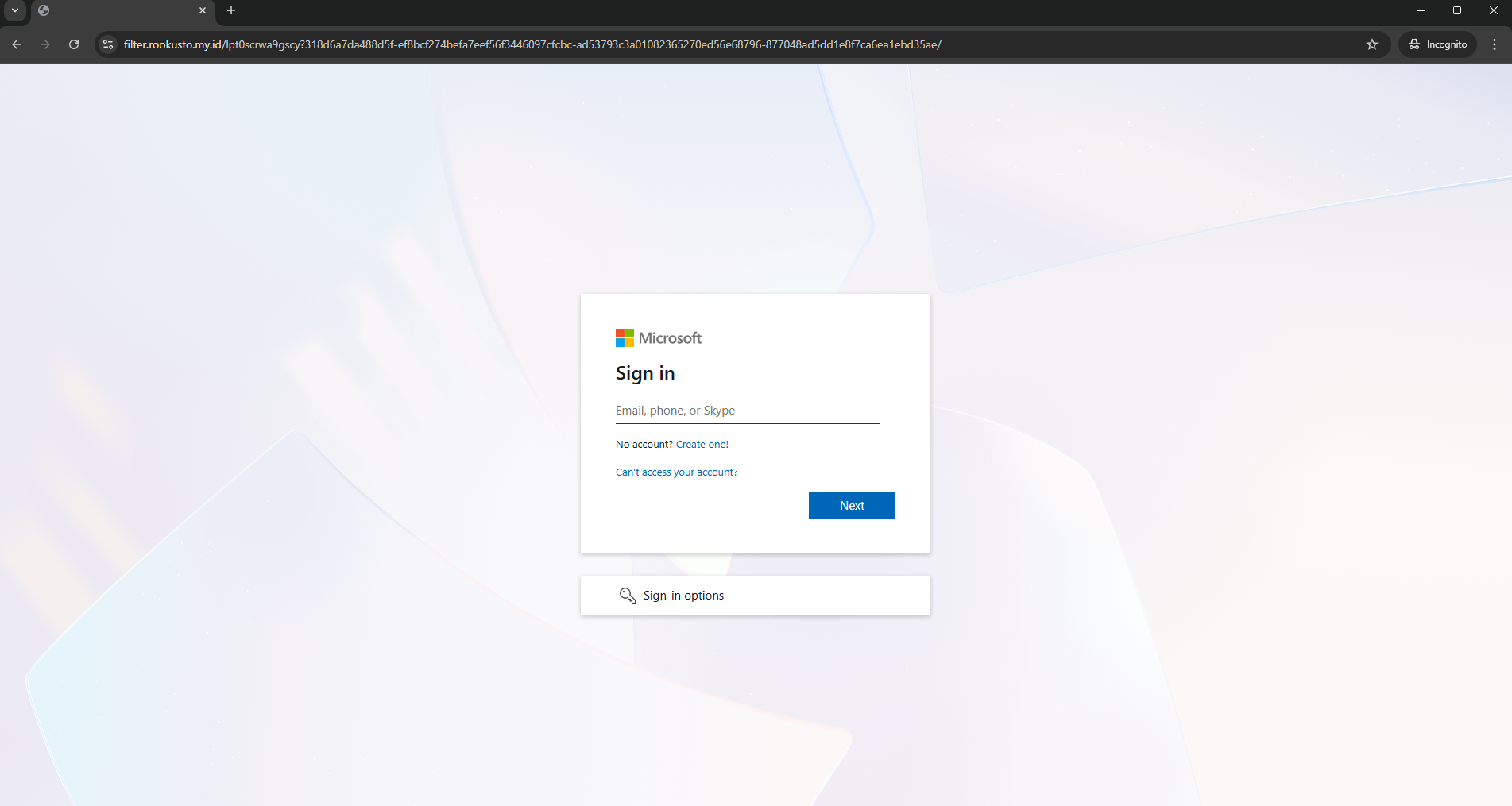
I ran the URL through VirusTotal just to see how it was labeled, and to no surprise it had been flagged a malicious.
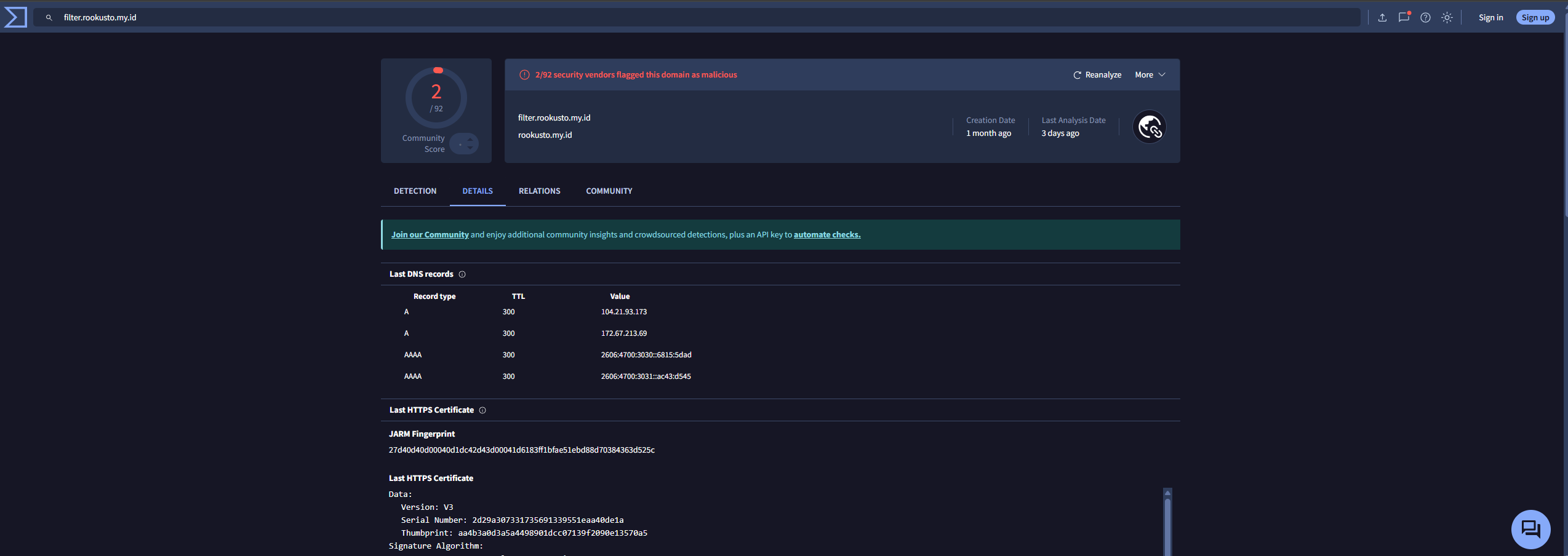
I did click around the actual webpage, filter.rookusto.my[.]id and what I found was just a shell of a webpage. What I found even more weird is when I changed my script to sleep longer and attempt to open the Chrome Dev Tools to further analyze the site it would completely shutdown. The nice thing however is when I set breakpoints I was able to step through the code, so I was able to take a copy of it and use ChatGPT to deobfuscate it to make it a little more readable to the human eye. It starts with checking to see if you are a Bot (the code below is the "obfuscated version" so you can get an idea of what I was seeing before I ran it through ChatGPT).
    const sFrHAIvTPC = typeof globalThis !== 'undefined' ? globalThis : window;
    const gTGllgSgSM = sFrHAIvTPC["navi" + "gator"];

    if (
        gTGllgSgSM["web" + "driver"] ||
        sFrHAIvTPC["call" + "Phantom"] ||
        sFrHAIvTPC["_phantom"] ||
        gTGllgSgSM["user" + "Agent"].includes("Burp")
    ) {
        sFrHAIvTPC["loca" + "tion"] = "about:blank";
    }
Even in the obfuscation you can see the variables include, "webdriver", "callPhantom", "_phantom", and "Burp", all of these are considered to automated softwares so it checking to ensure that none of these are being used. The code then continues.
sFrHAIvTPC["docu" + "ment"]["addEventListener"]("key" + "down", function (wMdDZxagGE) {
    function zodtudCWiT(HpuPQdPeet) {
      const FdGuAqEVnt = [
        { keyCode: 123 },
        { ctrl: true, keyCode: 85 },
        { ctrl: true, shift: true, keyCode: 73 },
        { ctrl: true, shift: true, keyCode: 67 },
        { ctrl: true, shift: true, keyCode: 74 },
        { ctrl: true, shift: true, keyCode: 75 },
        { ctrl: true, keyCode: 72 },
        { meta: true, alt: true, keyCode: 73 },
        { meta: true, alt: true, keyCode: 67 },
        { meta: true, keyCode: 85 }
      ];
      return FdGuAqEVnt.some(CtFaFeyZYN =>
        (!CtFaFeyZYN.ctrl || HpuPQdPeet.ctrlKey) &&
        (!CtFaFeyZYN.shift || HpuPQdPeet.shiftKey) &&
        (!CtFaFeyZYN.meta || HpuPQdPeet.metaKey) &&
        (!CtFaFeyZYN.alt || HpuPQdPeet.altKey) &&
        HpuPQdPeet.keyCode === CtFaFeyZYN.keyCode
      );
    }
The first line in particular really gives away what this function is doing - { ctrl: true, shift: true, keyCode: 73 } which is ctrl+shift+i (the keycode table can be found here.This keycode combination opens the Dev Tools in Chrome. The code finally has a listener and has a function that if you have the Dev Tools open it will redirect you to a non-malicious website.
sFrHAIvTPC["docu" + "ment"]["addEventListener"]("context" + "menu", function (bBqZjEmiep) {
    bBqZjEmiep["preventDefault"]();
    return false;
  });

  XqtmMsXABH = false;

  (function gPKCzpwJdE() {
    let tzRwDGkDug = false;
    const ZRxPJqtQmR = 100;

    setInterval(() => {
      const EIhvRtEGff = performance["now"]();
      debugger;
      const pXMXcIDeUx = performance["now"]();

      if (pXMXcIDeUx - EIhvRtEGff > ZRxPJqtQmR && !tzRwDGkDug) {
        XqtmMsXABH = true;
        tzRwDGkDug = true;
        sFrHAIvTPC["location"]["replace"]("https://zalando[.]com");
      }
    }, 100);
  })();function iz(){
No AI used in the making of this post that I know of atleast 😀
To wrap up!
Mitre Att&ck Techniques
The phishing page is using Microsoft's Dyanmics 365 infrastructure to bypass DMARC, DKIM and SPF checks to get the email delivered to the end users inbox. Before landing on the Microsoft login page it checks to ensure that you are not using a sandbox or any automated tools like Selenium or Burpsuite. It also checks to ensure you don't the Dev Tools open in your browser - if you do it will redirect you to a benign website. I didn't go as far as putting in any credentials on the site mainly cause I am not sure it would be worth doing and I am not sure how I would see where those are going (maybe something further to look into ). But overall it was pretty interesting to see how malicious actors are using infrastructure from large tech companies to further bolster their phishing pages.